
The bigger point is that “open source” is not a magic security badge. A wallet can publish its code and still leave you exposed through an untrusted backend, weak release process, poor key management, or a binary that you never actually verified. For serious self-custody, I look at the whole chain: source code, license, reproducible builds, hardware design, release signatures, backend dependencies, and the people who actually review the project.
Why Open Source Matters So Much for Crypto Wallets
When you put money into a bank account, you are trusting an institution to maintain an internal system correctly. With a self-custodial crypto wallet, the relationship is very different. The software is directly involved in generating, storing, deriving, displaying, and signing with the keys that control your assets.
That makes the question “Can I see the code?” much more important than it would be for an ordinary consumer application.
An open-source crypto wallet is software whose source code is publicly available under terms that meet the accepted definition of open source. The Open Source Initiative makes an important distinction here: open source is not merely about being able to look at source code; the license must also provide freedoms around using, modifying, and redistributing the software. You can read the formal criteria in the Open Source Definition maintained by the Open Source Initiative. (Open Source Initiative)
That distinction matters because crypto users sometimes see a GitHub repository and immediately assume, “Great, it’s open source.”
Not necessarily.
A developer can publish source code while placing restrictions on how you can modify, redistribute, or commercially use it. That may be source-available, but it is not necessarily open source in the conventional OSI sense.
And even genuine open source does not mean the software is automatically safe.
That’s where things get interesting.
The “Don’t Trust, Verify” Philosophy
Crypto inherited a strong distrust of centralized intermediaries from the cypherpunk movement. The basic idea is simple: if a system controls something important, you should ideally be able to inspect how that system works rather than blindly accepting the operator’s promises.
For wallets, this becomes almost painfully practical.
Imagine that a wallet developer tells you:
“Don’t worry. We never export your private key.”
If the wallet is closed source, you have to take that statement largely on faith unless an independent auditor has deeply inspected the application.
With open source, the situation changes. Developers expose the implementation, researchers can examine it, security teams can review it, and technically capable users can build it themselves.
The Open Source Initiative explains open source as a model based on transparency and distributed peer review, which is particularly relevant to security-sensitive applications such as cryptocurrency wallets. (Open Source Initiative)
But I would add an important qualification: visibility is not verification.
A million lines of publicly available code do not help you much if nobody understands them.
That is why I prefer the phrase “don’t trust, verify” rather than simply “open source.”
A serious wallet project should ideally provide several layers of evidence:
- Public source code
- A recognized open-source license
- A transparent release history
- Reproducible or deterministic builds where practical
- Signed releases
- Published checksums
- Independent security research
- A responsive vulnerability-disclosure process
- Clear documentation about dependencies and backend infrastructure
The stronger these layers are, the less you have to rely on the manufacturer’s reputation alone.
The Anatomy of an Open-Source Crypto Wallet
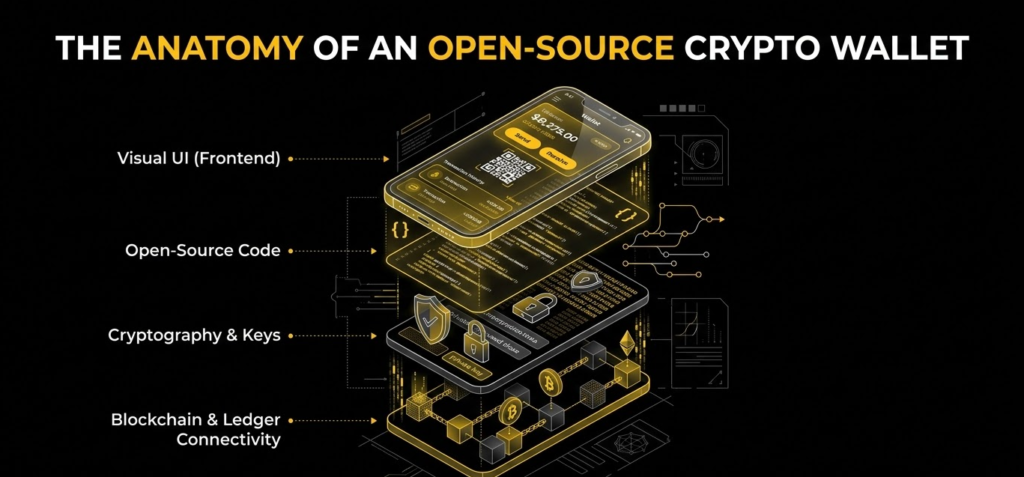
Think about a wallet as a chain rather than a single application.
A simplified version looks like this:
Developer source code → compiler/build system → released binary → your computer or phone → wallet key management → blockchain/RPC connection → transaction signing
Open source primarily gives you visibility into the first part of that chain.
The problem is that an attacker does not necessarily need to compromise the source code.
They could target:
- the build server,
- the compiler,
- release infrastructure,
- package dependencies,
- distribution channels,
- update mechanisms,
- third-party libraries,
- or the hardware itself.
This is why reproducible builds are such a big deal.
Suppose the public GitHub repository contains perfectly clean code. The developer then compiles a binary and quietly inserts malicious code before publishing the executable.
You download the binary.
The GitHub source looks clean.
Your wallet is compromised.
That is the gap reproducible builds are designed to close.
Open Source vs. Source-Available
This is one of those distinctions that sounds academic until you’re trusting a wallet with life-changing money.
Under an open-source license, users receive meaningful freedoms to use, study, modify, and redistribute software. The OSI’s list of approved licenses includes widely used families such as MIT, Apache 2.0, and GPL variants. (Open Source Initiative)
A source-available project can look similar from the outside because you may still be able to browse the repository.
The difference is in the legal permissions.
| Model | Source visible? | Modify? | Redistribute? | Typical goal |
|---|---|---|---|---|
| Open source | Yes | Yes | Yes, subject to license | Transparency + collaboration |
| Source available | Usually | Restricted | Restricted | Transparency without full software freedom |
| Closed source | No | No | No | Proprietary control |
For crypto, I prefer projects where the license is clear and the repository is genuinely usable by the community.
It is not because MIT is automatically “more secure” than GPL, or because GPL magically prevents bugs. The license affects the rights around the software; security comes from the engineering, review, architecture, and operational processes built around it.
That distinction is easy to miss.
Reproducible Builds: The Missing Piece Most Users Ignore
This is probably the most important concept in the entire article.
You can publish source code and still distribute a binary that doesn’t correspond to that source.
A reproducible build attempts to make compilation deterministic enough that independent parties can compile the same source and obtain the same binary output.
In other words:
Public source + controlled build process → independently reproduced binary → matching result
If the hashes match, you have considerably stronger evidence that the binary corresponds to the source code everyone can inspect.
The Reproducible Builds project promotes this approach because software should ideally be independently rebuildable rather than requiring users to blindly trust whoever produced the downloadable executable.
This is not theoretical.
Sparrow Wallet documents that its release binaries are reproducible, with its project specifically describing reproducibility from version 1.5.0 onward for the relevant build artifacts. (Sparrow Wallet)
Electrum takes a similar approach. Its official download page states that its executables are reproducible and independently signed by multiple builders, while also warning users not to download the wallet from unofficial sources and to verify GPG signatures. (Electrum)
BitBox02 goes even further in documenting the process. Its manufacturer explains that users can compile the open-source firmware themselves and compare the resulting hash with the official firmware. The company provides an actual verification workflow using SHA-256 and GPG assertions. (BitBox)
This is exactly the sort of thing I want to see from a wallet manufacturer.
Not:
“Trust us, our firmware is secure.”
But:
“Here is the source. Here is the build process. Here is the released binary. Here is how you independently compare them.”
That is a completely different security posture.
Public Code Does Not Automatically Mean Secure Code
There is another trap here.
People sometimes treat open source as if it were synonymous with secure.
It isn’t.
Open source creates the possibility of meaningful inspection. It doesn’t guarantee that inspection actually happens or that reviewers understand every part of the system.
A wallet can be open source and still suffer from:
- cryptographic implementation mistakes,
- memory-safety vulnerabilities,
- insecure randomness,
- bad key derivation,
- malicious dependencies,
- phishing-prone UX,
- poor transaction verification,
- compromised build infrastructure,
- weak update mechanisms,
- or a vulnerable backend.
So when I evaluate an open-source crypto wallet, I don’t stop at GitHub.
I want to know:
Who maintains it?
How active is development?
Are security reports public?
Are releases signed?
Can binaries be reproduced?
Are dependencies pinned and reviewed?
Does the wallet communicate with a centralized server?
Can I connect it to my own node?
Is the hardware design documented?
Those questions tell you much more than a green “public repository” badge.
Open-Source Software Wallets vs. Open-Source Hardware Wallets
There is a major difference between an open-source software wallet and an open-source hardware wallet.
A software wallet generally means that the code running on your computer or phone is publicly inspectable.
A hardware wallet adds another layer:
What exactly is inside the physical device?
That includes:
- Microcontrollers
- Secure elements
- Random-number generators
- Bootloaders
- Firmware
- Printed circuit boards
- Hardware interfaces
- Physical attack protections
- Manufacturing and supply-chain assumptions
This is where “fully open source” becomes much harder to achieve.
The Secure Element Problem
Secure elements are specialized chips designed to protect secrets against certain physical and logical attacks.
They can be extremely useful.
But they can also create a transparency problem.
Some secure elements are proprietary, and their internal designs are not fully disclosed. Manufacturers may rely on confidentiality agreements with chip vendors, which means the wallet company cannot simply publish every detail.
That creates an interesting trade-off.
You might have:
Open wallet firmware + proprietary secure element
or:
Open firmware + open microcontroller architecture + alternative security model
Neither approach is automatically superior in every threat model.
This is why I would not simply rank hardware wallets according to whether a marketing page says “open source.”
You have to ask what exactly is open.
Trezor, for example, says its device software has always been open source and auditable, and it publishes source code and build information for its devices. (Trezor) Its hardware repository also publishes design materials, including schematics and bills of materials for supported designs, under open hardware licensing. (GitHub)
BitBox02 uses a different architecture. Its documentation describes fully open-source firmware and a dual-chip design that combines an open microcontroller environment with a secure chip for physical protection. It also emphasizes reproducible firmware builds. (BitBox)
Blockstream Jade takes another route. Its current documentation describes Jade as fully open source, while its security architecture uses a virtualized secure-element concept rather than simply relying on a conventional proprietary secure-element implementation. (Blockstream)
That is exactly why the open-source hardware category is so interesting.
Different manufacturers are effectively answering the same question in different ways:
How do we minimize the amount of trust the user must place in us?
The Best Open-Source Crypto Wallets for 2027

There isn’t one universal winner.
If you only hold Bitcoin, your ideal wallet may look completely different from the wallet I would recommend to someone constantly interacting with EVM DeFi applications.
Here are the projects I would put on the shortlist.
Trezor – Best Overall Open-Source Hardware Wallet
Trezor remains one of the strongest names if your priority is transparency.
Its biggest advantage is not a single feature. It is the philosophy of publishing the software and substantial portions of the hardware design so that researchers and technically capable users can inspect the architecture.
Trezor explicitly states that its device software is open source and that users can inspect, verify, build, and review the code. (Trezor)
Its hardware repository also makes the design unusually transparent. The public repository identifies itself as Open Source Hardware and provides hardware design files, while its Model T documentation includes schematics and a bill of materials. (GitHub)
For me, that makes Trezor particularly attractive if you want:
- Open firmware
- Public hardware documentation
- Strong community visibility
- A mature hardware-wallet ecosystem
- A straightforward self-custody experience
Trezor’s newer devices also use additional hardware security mechanisms. Its current documentation describes Secure Element components in the Safe 3 and Safe 5, while the Safe 7 uses a more layered design. (Trezor)
The important takeaway is that “open source” does not mean Trezor has no hardware security. The two concepts can coexist.
BitBox02 – Best for Reproducible Builds
If reproducibility is the thing that makes you sit up and pay attention, BitBox02 deserves a very close look.
Its manufacturer explicitly publishes its firmware source, application source, hardware documentation, and reproducible-build process. (BitBox)
The interesting part is that you don’t have to take the company’s word for it.
You can compile the firmware yourself.
Then you can calculate the SHA-256 hash.
Then you can compare that result against the published release.
The company documents commands for doing exactly that, including a shasum -a 256 workflow and signed assertions. (BitBox Blog)
That is powerful because it converts an abstract security claim into something independently testable.
BitBox02 also uses a dual-chip architecture, with its documentation describing a secure chip for physical protection alongside open-source firmware. (BitBox)
For a technically minded Bitcoin holder, that’s a compelling combination.
One current detail is worth mentioning: the original BitBox02 is not designed for iPhone/iPad use, while the newer BitBox02 Nova adds iPhone and iPad support over Bluetooth. (BitBox)
So if you’re specifically building an Apple-centered setup, make sure you choose the appropriate model rather than assuming all BitBox02 variants have identical connectivity.
Blockstream Jade – Best Fully Open Bitcoin Hardware Approach
Jade is particularly interesting because it is unapologetically Bitcoin-focused and takes a different approach to hardware security.
Blockstream describes Jade as fully open source and says its architecture avoids dependence on proprietary secure-element chips in the traditional sense. (Blockstream)
The company has also introduced Jade Core, describing its hardware and firmware as open source while using a “Blind Oracle” architecture for PIN protection. (Blockstream)
If you’re a Bitcoin-only user, that narrower scope can actually be an advantage.
Less functionality can mean less code and fewer unnecessary features.
You don’t need your Bitcoin hardware wallet to understand 400 obscure tokens if all you want to do is securely hold BTC.
Jade is especially appealing to users who care about:
- Bitcoin-only architecture
- Open hardware
- Open firmware
- Air-gapped transaction workflows
- Self-verification
- Reducing reliance on proprietary security components
Sparrow Wallet – Best Open-Source Bitcoin Desktop Wallet
For serious Bitcoin users, Sparrow is one of my favorite examples of what an open-source wallet can look like when the product is designed around control rather than convenience.
Sparrow is a desktop Bitcoin wallet focused heavily on security, privacy, UTXO management, and hardware-wallet integration.
The project describes itself as free and open source and supports common standards such as PSBT while allowing advanced wallet management. (Sparrow Wallet)
More importantly, Sparrow’s reproducibility isn’t just a vague statement. Its documentation says release binaries have been reproducible since version 1.5.0 for the relevant build stages. (Sparrow Wallet)
That makes Sparrow particularly interesting for users who want to combine:
Bitcoin + hardware wallet + their own node + granular UTXO control.
This is not the wallet I would necessarily hand to someone buying their first $50 of Bitcoin.
But once you start caring about change addresses, coin selection, transaction construction, PSBTs, privacy, and node sovereignty, Sparrow becomes much more compelling.
Electrum – Best Mature Open-Source Bitcoin Wallet
Electrum is one of the veterans.
Its strength is maturity.
The project distributes its software under the MIT license and has long emphasized reproducible executables and cryptographic signatures. Its official download page currently instructs users not to download Electrum from unofficial sources and to verify GPG signatures. (Electrum)
That last point matters enormously.
A wallet can be perfectly secure in theory, but if you download a fake copy from a random website, none of that matters.
Electrum’s release process is therefore part of the security model, not an administrative detail.
For someone who wants a well-established Bitcoin wallet with a strong open-source culture, Electrum remains an obvious candidate.
Rabby – Best Open-Source EVM Wallet
If your world is Ethereum and other EVM-compatible networks, the decision changes.
Rabby is an open-source browser wallet built specifically around the DeFi ecosystem. Its public repository describes it as an open-source browser plugin for Ethereum and other EVM chains. (GitHub)
That makes it an interesting alternative for users who want more transparency than a purely proprietary Web3 interface.
But there is an important lesson here.
An open-source wallet can still depend on external infrastructure.
If your wallet communicates with centralized RPC providers, price feeds, transaction simulation services, or other third-party APIs, those components remain part of your practical security and privacy model.
Open source does not magically turn a centralized backend into a decentralized one.
Cake Wallet – Best Open-Source Privacy-Focused Multi-Asset Wallet
Cake Wallet is another project worth watching if you care about privacy and open development.
Its public repository describes Cake Wallet as an open-source, non-custodial, multi-currency wallet supporting assets including Monero and Bitcoin, among others. (GitHub)
The project also exposes its source code publicly and provides information for verifying certain releases.
For privacy-conscious users, the Monero support is particularly relevant because Monero’s protocol itself is designed around transaction privacy rather than simply hiding your wallet application’s source code.
That distinction is crucial:
Open-source wallet software and privacy-preserving blockchain protocols solve different problems.
You can have an open-source wallet that provides almost no on-chain privacy.
And you can use a privacy-oriented blockchain through software that isn’t completely open.
Ideally, you want both.
BlueWallet – Best Open-Source Mobile Bitcoin Wallet
BlueWallet is a practical choice if you want open-source Bitcoin functionality on a phone.
Its public repository describes it as a Bitcoin and Lightning wallet for iOS and Android, and the project is distributed under the MIT license. (GitHub)
One thing I like about projects such as BlueWallet is that you can actually inspect the development activity rather than relying entirely on polished marketing material. Its public GitHub repository exposes the code, issues, pull requests, licensing information, and build instructions. (GitHub)
For mobile users, that’s valuable because your threat model is different from a desktop Bitcoin power user’s threat model.
Your phone is convenient.
It is also connected to everything.
So I would treat a mobile wallet as a spending wallet or active wallet unless I have a specific reason to use it for larger long-term holdings.
Best Open-Source Wallets at a Glance
| Wallet | Category | Main Strength | Open-Source Focus | Best For |
|---|---|---|---|---|
| Trezor | Hardware | Transparent architecture | Firmware + hardware documentation | General self-custody |
| BitBox02 / Nova | Hardware | Reproducible firmware | Firmware + app + hardware transparency | Security-focused users |
| Blockstream Jade | Hardware | Bitcoin-first open architecture | Hardware + firmware | Bitcoin maximalists |
| Sparrow | Desktop | UTXO and privacy control | Open-source + reproducible builds | Advanced Bitcoin users |
| Electrum | Desktop | Maturity | Open-source + signed reproducible releases | Long-time Bitcoin users |
| Rabby | Browser | EVM/DeFi | Open-source wallet code | Web3 users |
| Cake Wallet | Mobile/Desktop | Privacy + multi-asset | Open-source | Privacy-conscious users |
| BlueWallet | Mobile | Simplicity + Bitcoin/Lightning | MIT-licensed source | Everyday Bitcoin use |
How to Verify an Open-Source Wallet Yourself
You don’t need to become a cryptographer to improve your wallet security.
You can start with three simple concepts:
Source → hash → signature
That’s already much better than blindly clicking “Download.”
Download From the Official Project
This sounds boring, but it is probably the most important step.
Don’t Google a wallet name and click the first download button you see.
Attackers routinely create fake wallet websites designed to look almost identical to legitimate ones.
Use the project’s official website and follow its release links.
Electrum explicitly warns users not to download the software from sources other than its official domain. (Electrum)
For Sparrow, the project publishes its release binaries and manifest signatures through its official download infrastructure. (Sparrow Wallet)
For open-source projects hosted on GitHub, check that you’re looking at the correct organization and repository rather than a similarly named fork.
A fake repository can contain convincing documentation.
The fact that it has a README does not make it legitimate.
Verify the SHA-256 Checksum
A SHA-256 checksum gives you a fingerprint for a file.
If the developer publishes:
ABC123...
and your downloaded file produces the exact same hash, the file contents match the published file.
On macOS or Linux, you might use:
shasum -a 256 wallet-file.dmgOn Windows PowerShell:
Get-FileHash .\wallet-file.exe -Algorithm SHA256Then compare the result with the checksum published by the wallet developer.
But there is one subtle point.
The checksum itself must come from somewhere you trust.
If an attacker compromises both the binary and the checksum file, comparing the two won’t help.
That is where signatures become useful.
Verify GPG or PGP Signatures
A cryptographic signature provides evidence that a specific private key signed a release or manifest.
The basic idea is:
Developer private key → signs release
and
Your computer → verifies signature using public key
This doesn’t eliminate every possible supply-chain attack, but it gives you another independent layer of assurance.
Electrum explicitly recommends GPG verification and uses multiple independent builders/signers for its current release process. (Electrum)
Sparrow also publishes signed manifests alongside its downloads, giving technically capable users another way to validate the release. (Sparrow Wallet)
For me, a signed release plus reproducible build is far more convincing than a simple “download the latest version” button.
Reproducibility Is More Important Than GitHub Stars
A project can have thousands of GitHub stars and still have a weak release pipeline.
Stars measure popularity.
They do not prove:
- secure key generation,
- correct transaction signing,
- safe dependency management,
- reproducible builds,
- release integrity,
- hardware authenticity,
- or backend privacy.
This is why I would rather see a smaller project with:
reproducible builds + signed releases + public audits
than a huge project with a million stars but opaque binaries.
BitBox02 provides a good example of this philosophy. Its documentation doesn’t stop at “our firmware is open source”; it describes how users can reproduce the firmware and compare the resulting hash against official releases. (BitBox)
That is measurable.
And measurable security is much more useful than marketing language.
The Backend Problem: Your Wallet Can Be Open Source and Still Leak Information
Here’s a mistake I see surprisingly often.
Someone says:
“I use an open-source wallet, so I’m private.”
Not necessarily.
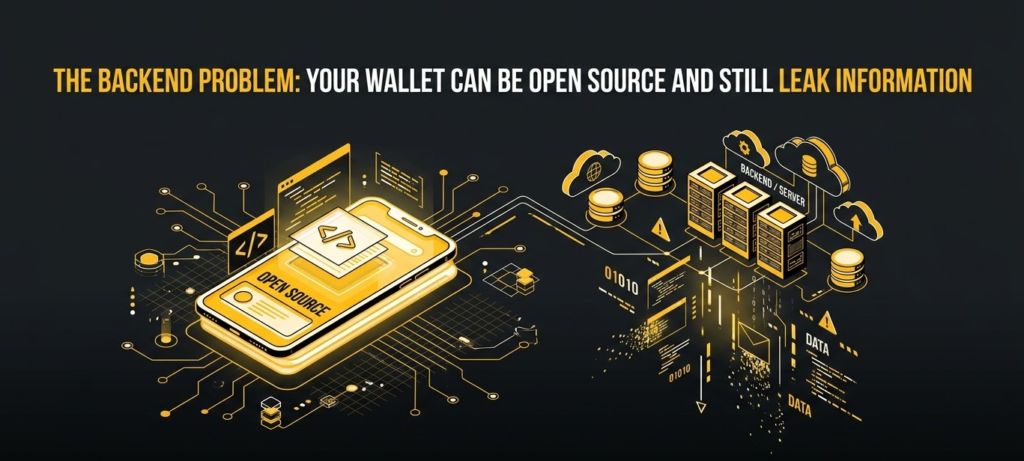
Suppose your wallet is fully open source but automatically connects to a centralized RPC provider.
Your private key may remain safely on your device.
That’s good.
But your wallet address queries, transaction broadcasts, timing information, and network metadata may still pass through third-party infrastructure.
So there are really multiple layers of sovereignty:
Key sovereignty
Can someone else spend your coins?
Software sovereignty
Can you inspect the wallet software?
Build sovereignty
Can you verify that the binary matches the source?
Network sovereignty
Can you control or audit the node infrastructure?
Hardware sovereignty
Can you understand what the physical device is actually doing?
The strongest self-custody setups try to address as many of these layers as practical.
This is one reason Sparrow’s ability to work with private Bitcoin infrastructure is attractive to advanced users. An open-source interface combined with your own Bitcoin node gives you a very different trust model from a wallet that quietly routes everything through a company’s infrastructure. (Sparrow Wallet)
Open Source Hardware Does Not Eliminate Supply-Chain Risk
Let’s say you’ve found a beautiful open-source hardware wallet.
You inspect the firmware.
You inspect the PCB design.
You reproduce the build.
Are you done?
Not quite.
There is still the physical supply chain.
An attacker could theoretically interfere with:
- components,
- firmware loaded during manufacturing,
- device packaging,
- replacement devices,
- cables,
- counterfeit products,
- or the distribution channel.
This is why manufacturers increasingly use device-attestation mechanisms.
BitBox02, for example, documents a device-authenticity process intended to verify that the device was genuinely programmed by the manufacturer. (BitBox)
Trezor likewise documents device authentication mechanisms for its newer hardware. (Trezor)
And Trezor warns users to purchase through official or authorized channels because an unauthorized device could have been accessed before it reached the buyer. (Trezor)
So don’t think:
Open source = supply-chain solved.
Think:
Open source = supply-chain risk becomes more inspectable.
That’s a much more accurate statement.
The “Fully Open” Hardware Question
It is tempting to rank wallets with a simple checkbox:
Open source: Yes / No
But the reality is more nuanced.
Consider these layers:
| Layer | What you should ask |
|---|---|
| Wallet application | Is the source public? |
| Firmware | Is the firmware public? |
| Bootloader | Is the bootloader inspectable? |
| Hardware | Are schematics available? |
| Components | Are major components documented? |
| Secure element | Is its behavior/design transparent? |
| Build | Can releases be reproduced? |
| Signing | Are releases cryptographically signed? |
| Manufacturing | Can device authenticity be checked? |
| Backend | Can you run your own node? |
A wallet can score very well on some dimensions and poorly on others.
That’s normal.
The goal is not to find a mythical wallet with zero trust assumptions.
The goal is to minimize unnecessary trust assumptions.
Is Ledger Open Source?
This question comes up constantly, and the answer requires nuance.
Ledger has open-sourced portions of its software ecosystem, but it has historically kept important components of its device security architecture proprietary.
Ledger’s own documentation around BOLOS describes its operating system and its use of Secure Elements, while the company’s architecture has not followed the same fully open approach as projects such as Trezor or Jade. (Ledger)
So I would not classify Ledger as a fully open-source hardware wallet in the same sense as a project that publishes its complete firmware and hardware designs.
That doesn’t automatically mean Ledger is insecure.
It means the trust model is different.
This distinction is important because “closed source” and “unsafe” are not synonyms.
Likewise:
open source and secure are not synonyms.
You should evaluate both independently.
Why Hardware Wallets Still Make Sense Even When Software Is Open
You might reasonably ask:
“If the software is open source, why do I need a hardware wallet?”
Because the computer running your wallet is a hostile environment compared with a dedicated signing device.
Your laptop may contain:
- browser extensions,
- malware,
- remote-access software,
- keyloggers,
- malicious applications,
- compromised dependencies,
- or an infected operating system.
A hardware wallet attempts to create a separate security boundary.
Your computer prepares the transaction.
The hardware wallet receives the transaction.
You inspect the transaction on the device.
The device signs it.
The private key remains inside the hardware security boundary.
That separation is extremely valuable.
And when the hardware wallet itself is open source, you get another advantage: you can inspect more of the system you’re trusting to protect the key.
A Practical Security Setup I Would Use
If you asked me to design a reasonably serious self-custody setup without turning it into a research project, I would separate funds by purpose.
Everyday spending
Use a mobile open-source wallet such as BlueWallet for Bitcoin-focused spending or another well-reviewed wallet appropriate to your assets.
Keep relatively small amounts there.
The point is convenience.
Active trading
Use a desktop or browser wallet such as Rabby where appropriate, but treat it as a hot wallet.
Don’t keep your entire net worth connected to DeFi.
Your trading wallet should be expendable.
Long-term savings
Use an open-source hardware wallet such as Trezor, BitBox, or Jade depending on your asset requirements and preferred security model.
The long-term wallet should interact with as few websites and smart contracts as possible.
Advanced Bitcoin sovereignty
If you are comfortable operating infrastructure, pair a hardware wallet with Sparrow or Electrum and your own Bitcoin node.
That gives you substantially more control over the data path.
The architecture becomes:
Hardware wallet → desktop wallet → your node → Bitcoin network
rather than:
Hardware wallet → proprietary application → third-party infrastructure
Again, neither approach is automatically perfect, but the second model gives you more control.
What I Would Check Before Trusting Any New Open-Source Wallet
Before putting serious money into a new wallet, I would run through this checklist.
Source transparency
- Is the repository public?
- Is the repository controlled by the actual developer?
- Is the commit history visible?
- Is development active?
- Are security issues handled publicly?
License
- Is it actually open source?
- Is the license recognized?
- Are there restrictions that make it source-available rather than open source?
Build security
- Are releases reproducible?
- Are checksums published?
- Are binaries signed?
- Can multiple independent parties reproduce the release?
Key security
- How is entropy generated?
- Where are private keys stored?
- Is there a secure hardware boundary?
- Are seeds encrypted at rest?
- Does the wallet support hardware signing?
Network security
- What RPC or server does it use?
- Can you configure your own node?
- Does it leak wallet addresses to centralized infrastructure?
- Is Tor supported where appropriate?
Development security
- Are external audits available?
- Is there a bug bounty?
- Does the project publish security advisories?
- How quickly are vulnerabilities patched?
If a project cannot answer most of these questions, I would not make it the home of my long-term savings.
Frequently Asked Questions
What makes a crypto wallet truly open source?
A wallet is genuinely open source when its source code is publicly available under a license that meets the recognized Open Source Definition, allowing meaningful rights to use, study, modify, and redistribute the software. The Open Source Initiative’s definition provides the formal framework for determining whether a license qualifies. (Open Source Initiative)
For a serious crypto wallet, however, I would go one step further. I would look for open firmware, transparent dependencies, reproducible builds, signed releases, and a credible public review process.
Why is open-source code valuable for crypto wallets?
Because crypto wallets manage extremely sensitive cryptographic material.
If the implementation is closed, users have to place greater trust in the developer and external auditors. With open source, independent researchers can inspect how keys are generated, stored, derived, and used.
That does not guarantee security, but it makes hidden behavior considerably harder to conceal.
What is a reproducible build?
A reproducible build is a build process in which independent parties compiling the same source under the documented conditions can obtain the same binary output.
The practical purpose is simple: it helps establish that the downloadable software corresponds to the source code that everyone can inspect.
BitBox02 and Sparrow both provide public documentation around reproducible builds, while Electrum explicitly states that its release executables are reproducible and independently signed. (BitBox Blog)
Is Trezor fully open source?
Trezor’s software is open source, and the company publishes substantial hardware design information as well. Its public hardware repository includes schematics and bills of materials for supported designs, while its security documentation explains how its device software can be inspected and built. (Trezor)
However, always evaluate the specific device generation you intend to buy because hardware architectures evolve over time.
Is BitBox02 open source?
Yes. BitBox states that its firmware and application are open source and also publishes hardware-related transparency information. Its firmware is designed to be reproducible, allowing users to compile it independently and compare hashes with official releases. (BitBox)
The current BitBox lineup also includes the BitBox02 Nova, which adds iPhone and iPad support, while the original BitBox02 has more limited mobile compatibility. (BitBox)
Is Blockstream Jade open source?
Blockstream describes Jade as fully open source and publishes both hardware and firmware information. The current Jade family includes security mechanisms designed around an open architecture rather than simply relying on a conventional proprietary secure element. (Blockstream)
That makes Jade particularly interesting for Bitcoin users who place a high value on open hardware.
Is Ledger open source?
Ledger has open-source components, but its overall hardware security architecture is not fully open in the same way as Trezor or Jade. Important parts of its device software and Secure Element environment remain proprietary.
Ledger’s own material describes BOLOS and its Secure Element architecture, so users should evaluate Ledger under a different trust model rather than simply categorizing it as equivalent to fully open hardware projects. (Ledger)
Can hackers exploit open-source wallet code?
They can certainly inspect it.
That’s actually one of the fundamental trade-offs of public code: attackers get visibility too.
But security researchers get the same visibility. The goal is not to make vulnerabilities impossible to find; it is to make the ecosystem capable of finding, discussing, fixing, and verifying them.
This is why active maintenance, independent audits, bug bounties, reproducible builds, and public security disclosures matter so much.
Open source gives you transparency.
It does not give you immunity.
What is the difference between open source and source available?
Open source provides legally meaningful freedoms to use, modify, and redistribute software according to the license.
Source-available projects may let you inspect the code while restricting modification, redistribution, or commercial use.
The OSI’s Open Source Definition and approved-license framework are useful references when you want to determine whether a license is actually open source rather than merely transparent. (Open Source Initiative)
How can I verify that my downloaded wallet matches the public source code?
Start by downloading the software only from the project’s official release channel.
Then:
- Obtain the published checksum.
- Calculate the SHA-256 hash of your downloaded file.
- Compare the two values.
- Verify the developer’s GPG/PGP signature where available.
- If reproducible builds are supported, compile the source yourself and compare the resulting binary.
For example, BitBox documents a workflow in which users build firmware independently and use SHA-256 hashes to compare the result with the official release. (BitBox Blog)
Trezor also documents reproducible firmware verification procedures, including hash comparisons for its devices. (Trezor Docs)
Is an open-source wallet automatically safer than a closed-source wallet?
No.
I would say it is potentially more auditable, which is a different claim.
A well-maintained closed-source wallet with a strong hardware architecture and extensive independent auditing may be safer in practice than a neglected open-source wallet nobody reviews.
The strongest setup combines transparency with good engineering.
What is the best open-source Bitcoin wallet?
For desktop Bitcoin management, I would put Sparrow and Electrum near the top of the list.
Sparrow is particularly strong for advanced UTXO management, hardware-wallet integration, privacy, and private-node workflows, while Electrum offers a mature ecosystem and a well-established reproducible-release process. (Sparrow Wallet)
For mobile use, BlueWallet is an attractive open-source Bitcoin option, while for hardware custody, Trezor, BitBox02, and Blockstream Jade each offer different approaches to open security. (GitHub)
What is the best open-source hardware wallet?
There isn’t one answer for everyone.
If broad transparency and a mature hardware ecosystem are your priorities, Trezor is an excellent starting point.
If reproducible firmware and a dual-chip security architecture are particularly important to you, BitBox02 deserves serious consideration.
If you’re Bitcoin-only and strongly prefer an open hardware approach without relying on a traditional proprietary Secure Element model, Blockstream Jade is one of the most interesting choices.
The right answer depends on your threat model rather than a simple ranking.
Final Verdict: Open Source Is a Security Process, Not a Marketing Label
The biggest mistake you can make when shopping for an open-source crypto wallet is to treat the words “open source” as the end of your research.
They are actually the beginning.
A genuinely strong wallet project should make you feel that you can gradually replace trust with evidence.
You can inspect the code.
You can inspect the license.
You can inspect the release history.
You can verify signatures.
You can reproduce the build.
You can check the hardware.
You can examine the backend.
And, if you’re technically inclined, you can even build and run parts of the system yourself.
That’s the philosophy I would keep in mind when choosing a wallet for serious money:
Don’t ask only whether the wallet is open source. Ask how much of the entire security system you can independently verify.
For hardware, Trezor, BitBox02, and Blockstream Jade stand out because they approach transparency at the device level in different ways. (Trezor)
For Bitcoin desktop management, Sparrow and Electrum are particularly compelling because their projects combine open development with strong release-verification practices. (Sparrow Wallet)
For mobile Bitcoin use, BlueWallet provides a straightforward open-source option, while Cake Wallet is especially interesting if privacy and multi-asset support are part of your requirements. (GitHub)
And for EVM users, Rabby offers an open-source Web3 wallet alternative worth considering. (GitHub)
Ultimately, the best open-source crypto wallet isn’t necessarily the one with the most features, the most GitHub stars, or the loudest security marketing.
It is the one whose security assumptions you understand, whose software you can verify, and whose remaining trust requirements you’re genuinely comfortable accepting.
That’s the real meaning of “don’t trust, verify.”